
 Calls
Calls
 Phone numbers
 SMS
SMS
 Business Phone System
 CRM
CRM
 Call Tracking
 eSIM for Internet
 AI agent
 AI Speech Analytics
 Click to Call
 Video conferencing
 VoIP for Business
 Become a partner
 Integrations
 For whom
 Setup guides
 FAQ
FAQ
 Online chat
 Contact us
 Blog
Blog

- Zadarma Webhooks features
- When is setting up Webhooks + IVR useful?
- Who is this useful for?
- Implementation examples
- Frequently asked questions
"For sales, press 1. For technical support, press 2”. But what if we told you that a voice menu doesn’t have to be boring, and can actually be useful? Your clients can get information and even answers to their questions without ever speaking to an operator.
With the Zadarma API and Webhooks, you can not only create a multi-level voice menu but also build your own secretary bot or automated information bot connected to your database. Who can benefit from this and how to set it up is explained in this article.
Zadarma Webhooks features
These features allow you to automate call handling, connect voice scenarios with external systems, and build flexible communication flows tailored to your business processes.
- Multi-level voice menu (IVR)
- Flexible call logic management
- CRM integration
- Custom audio support - upload your own greetings or generate them using text-to-speech
When is setting up Webhooks + IVR useful?
- Voice menu, where the client can enter an order number → a script checks the database → the current order status is read out loud;
- Auto-informer — the client can get up-to-date information on working hours, prices, and answers to popular questions;
- Multi-level menu — configure different menus and call scenarios depending on the type of input (DTMF or voice commands);
- CRM integration — after entering an ID, the system can find data → provide information → and depending on the selected action: record the call or create a lead.
Who is this useful for?
Primarily, a secretary bot or information bot is useful for online stores (regardless of the number of clients). With an auto-informer, you can reduce the company’s operational costs because clients can get answers without the involvement of an operator. Even the smallest e-commerce businesses with a single manager (who, of course, works only weekdays from 9 AM to 6 PM) can, thanks to a phone informer, both respond to the most common customer inquiries and track order status.
Example — a client calls your store
- They are greeted by a voice menu: «Hello, this is store ###. To track your order, press 1; to check the opening hours of pickup points, press 2; for store addresses in your city, press 3; for any other questions related to purchases or delivery, we will connect you to an operator».
- The client presses 1.
- IVR asks them to enter the order number via keypad (6 digits).
- The client enters the order number.
- IVR sends a request, retrieves up-to-date information from your database, and returns a response as a template message. For example: «Your order is at pickup point number 3. You can collect your order daily from 9 AM to 6 PM, without breaks or holidays».
Such a popular and at first glance complex case can be implemented using Zadarma Webhooks.
Which methods are required for this?
To implement the task, you will need only two methods:
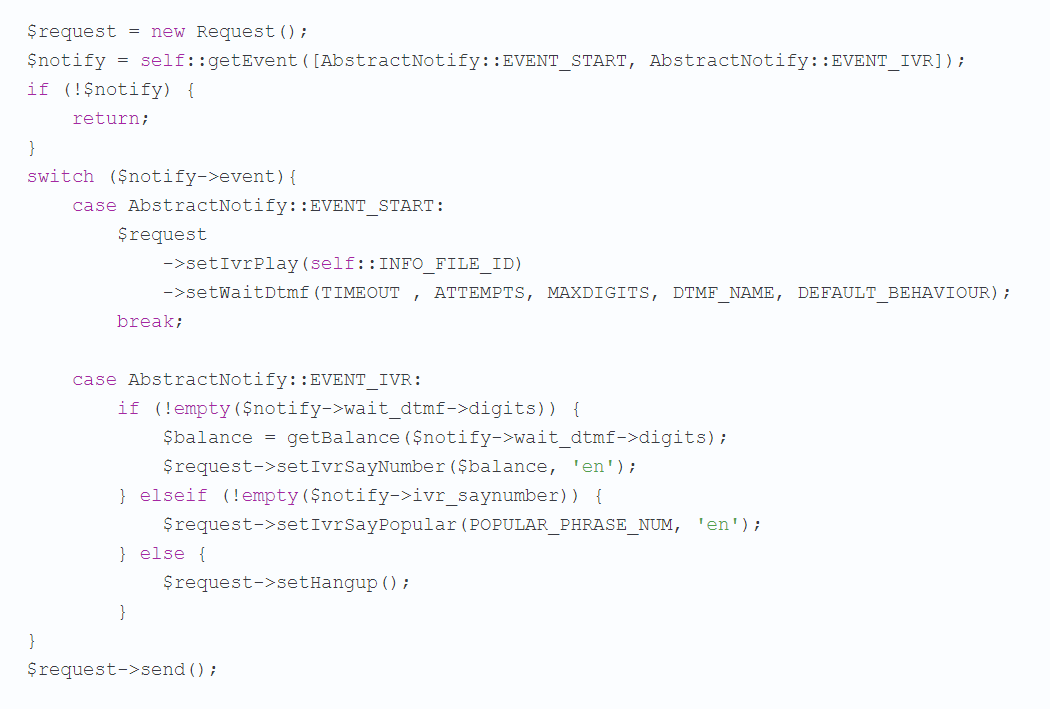
- NOTIFY_START — the beginning of an incoming call to the PBX
- NOTIFY_IVR — the callee’s response to the requested action
You can find the method descriptions in the Zadarma API. Here are the available actions:
- Play a file;
- Play a common phrase;
- Play digits;
- Play a number (according to the rules of complex numerals);
- Request digit input from the caller.
For example: after a call and a voice greeting, the client enters a digit in tone mode and reaches the second IVR level, which asks them to enter an order number. After the next digit input, the system sends a request to your database and returns a prerecorded voice message. You can create up to 100 template messages and send them to the client in response to a request. Or, with our standard number playback system, the answer from the database can be voiced as a number (in that case, you don’t need to create template messages). You might also find useful our earlier article on 12 examples of professional voicemail greetings.
What needs to be done?
4 simple steps:
Step 1. Enable the free Zadarma cloud PBX (initial setup is done through an easy wizard in your account. IVR can be configured later).
Step 2. Connect a virtual number (you can choose from numbers in 110 countries worldwide). If you already have a number, you can port it to the service.
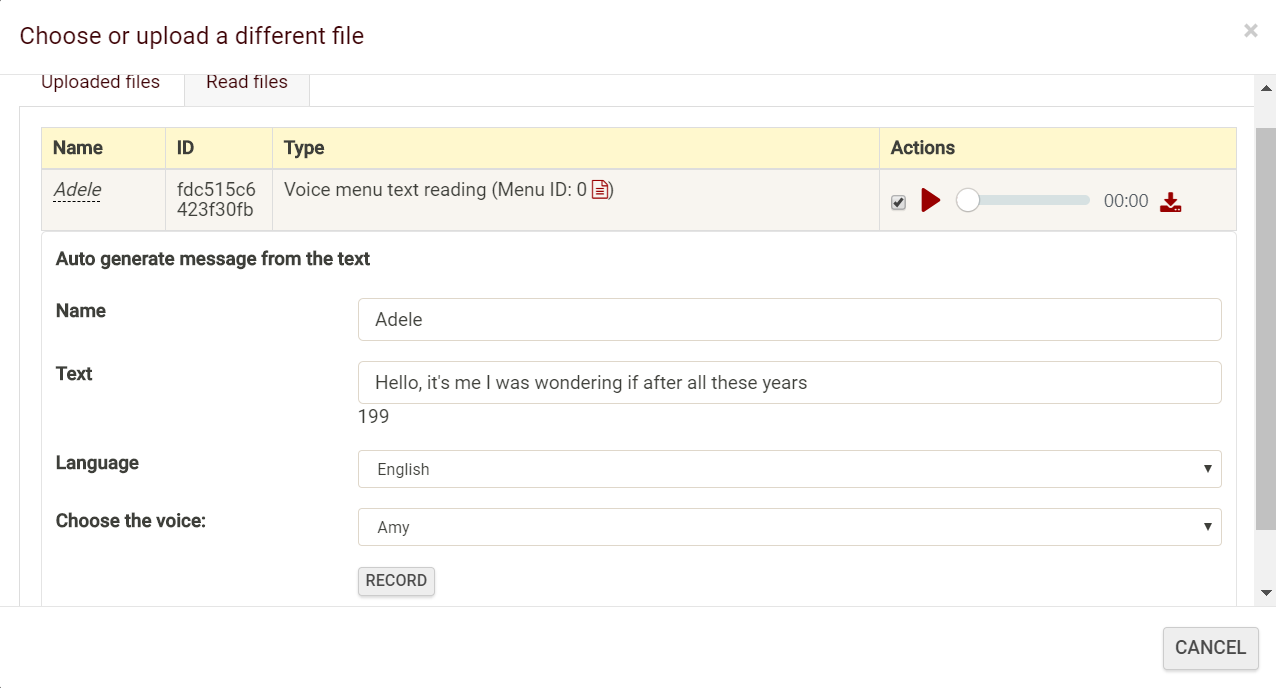
Step 3. In the “Incoming calls and voice menu” section of your account, create the required number of IVRs. You can upload your own audio files or simply type in the menu text and the system and the system will generate the voice output (16 languages available, each with several voices).
Step 4. Write simple code according to your task (programming skills required). Code examples are in the next section.
Implementation examples
On GitHub, there is a PHP example implementing three simple tasks:
- The voice menu pronounces the last 3 digits of the caller’s number;
- Using touch-tone dialing, the user enters their birth date, and the system tells them how many days remain until their birthday;
- An infinite IVR (a voice menu in which the user can go one step forward or one step back).
Here is another example of a popular use case:
After the voice greeting, the user enters their ID number via DTMF, the system sends a request to the database and returns a response, voicing the account balance, after which it says goodbye using one of the prerecorded template phrases.
Frequently Asked Questions
What does Webhook configuration give you?
It provides flexibility and the ability to create complex multi-level voice menus — from simple setups to advanced secretary bots or information bots that can handle many tasks without involving an operator.
When should you use Zadarma Webhooks?
If you’re interested in process automation, smart IVR with integration into your database or CRM, and personalized responses, this feature will be especially useful.
Can Webhooks be configured without programming knowledge?
To implement Webhooks, basic programming skills are required. Alternatively, you can contact specialists who can help you build the IVR solution you need.