
 Calls
Calls
 Phone numbers
 SMS
SMS
 Business Phone System
 CRM
CRM
 eSIM for Internet
 AI agent
 AI Speech Analytics
 Click to Call
 Call Tracking
 VoIP for Business
 Become a partner
 Integrations
 For whom
 Setup guides
 FAQ
FAQ
 Online chat
 Contact us
 Blog
Blog

The years of the pandemic transformed remote work from a temporary solution into the new normal, as more and more employees and managers recognize the benefits of this work format. Flexible schedules, adaptability, comfortable and straightforward working conditions, and the absence of a dress code - all of this appeals to millions of people around the world. However, every work format has both advantages and disadvantages. Why are more and more people choosing remote work, what are the specifics of working from home, and how can you organize it effectively? We explore these questions below.
Table of contents:
- Features of remote work
- Advantages of remote work
- Disadvantages of remote work
- What do you need to set up a home workspace?
- Which Zadarma services can help with remote work?
- How can you avoid burnout when working remotely?
- FAQs
Features of remote work
Working from home differs from the office format not only in terms of location but also in terms of certain psychological aspects that affect self-organization and discipline.
Let's take a closer look:
- workplace - you can choose your home, favorite coffee shop, park, hotel, etc. The main requirement is a stable internet connection;
- communication - work processes move into the digital environment: video conferences, chats, shared documents, task managers, and more;
- working schedule - it is agreed upon with your manager, but generally, the focus is on results rather than the number of hours spent in front of a screen;
- discipline and self-organization - now it is up to you to stay focused and avoid getting distracted by a funny video or an article about the Roman Empire. Plan your workday in advance, keep track of deadlines, manage your workload, and maintain good workplace habits;
- blurring the boundaries between work and home - at first, it can be difficult to switch off from work mode or, conversely, get into a productive mindset. That's why it is important to establish clear boundaries.
When choosing the optimal work format, we recommend weighing all the pros and cons and making an informed decision that will best support your professional development and ultimately pay off in the form of bonuses at the end of the month.
Advantages of remote work
- time savings - you can free up several hours a day simply because you no longer need to spend time getting ready for work or commuting;
- self-organization - you can work at your own pace without feeling like someone is constantly watching you;
- comfort - a well-organized workspace, a pleasant atmosphere, a favorite plant, or a pet can all have a positive impact on your emotional well-being and reduce stress at work;
- less background noise - you don't have to listen to a colleague's keyboard clicking or overhear other people's gossip. Background conversations are less likely to distract you or cause unnecessary stress. Working alone can put less strain on your nervous system.
Disadvantages of remote work
- less face-to-face interaction - sometimes having a chance to chat or gossip can be a form of therapy and help strengthen team connections. That's why it's important to make time for friends outside of work and replenish this social resource;
- blurred boundaries - fatigue can build up because there is no change of scenery: you work, live, and relax in the same place. We recommend having a hobby, exercising, or at least going for a 15-minute walk;
- self-discipline - sometimes it's difficult to explain to yourself why you shouldn't procrastinate and why maintaining a daily routine is important.
If you've decided that working outside the office is the best option for you, a logical question arises:
What do you need to set up a home workspace?
The most important things you need are yourself and the motivation to work. Besides the obvious essentials - a laptop and an internet connection - let's look at some less obvious factors that can help you create an effective workspace and have a positive impact on your adaptation and performance.
Consistent communication and access to information are the foundation of remote work. We've already covered the 6 hidden gem tools that can transform small business operations, but we'd like to highlight once again what you should pay attention to.
Essential services you'll find useful:
- Zadarma - an IP telephony service that can help reduce the cost of business calls, set up free integrations with other services, and access call analytics and recordings through a convenient interface.
- Zoom, Google Meet, Slack, Microsoft Teams - all of these services make team communication easier. You can find a list of integrations with Zadarma at this link.
- Task and project management services. Google Tasks, Microsoft To Do, Todoist, Jira… There are dozens of solutions available, and you should choose the one that best suits your needs in terms of features and ease of use. You may find that the built-in task manager in the free Teamsale CRM is all you need. If your team has more than five people, using project management tools becomes almost essential. It's worth giving them a try.
Take care of your digital security: use strong passwords, enable two-factor authentication, lock your screen when you step away from your workspace, and back up important documents.
Establish clear communication rules: define which tasks are priorities, when it's appropriate to make a call, and which issues can be resolved without one. Using statuses in your apps such as "Do Not Disturb", "Active", "Offline", and "Lunch Break" can also help reduce unnecessary messages.
Maintain regular communication with management: share information about processes that aren't working or are causing difficulties, and suggest your own solutions and ideas so that you don't become disconnected from the team.
Which Zadarma services can help with remote work?
Earlier, we looked at the main challenges employees face when working outside the office. How can you reduce stress and workload without compromising efficiency and productivity? In an office, many issues can be discussed in person, while with remote work, all arrangements and discussions move online. Routine processes should be automated whenever possible.
Zadarma's free Teamsale CRM is a tool that helps you stay involved in work processes wherever you are. With this system, you can manage both internal communication and customer interactions in one place. Let's take a closer look at some of the features that can be especially useful.
First and foremost, there is the customer database. Your interaction history with both new and existing customers is stored in one interface, with detailed information about each customer available in their profile. You can also make calls with a single click, saving valuable time.
In addition to managing customer interactions, you can monitor employee performance using convenient filters, access settings, and team restrictions.
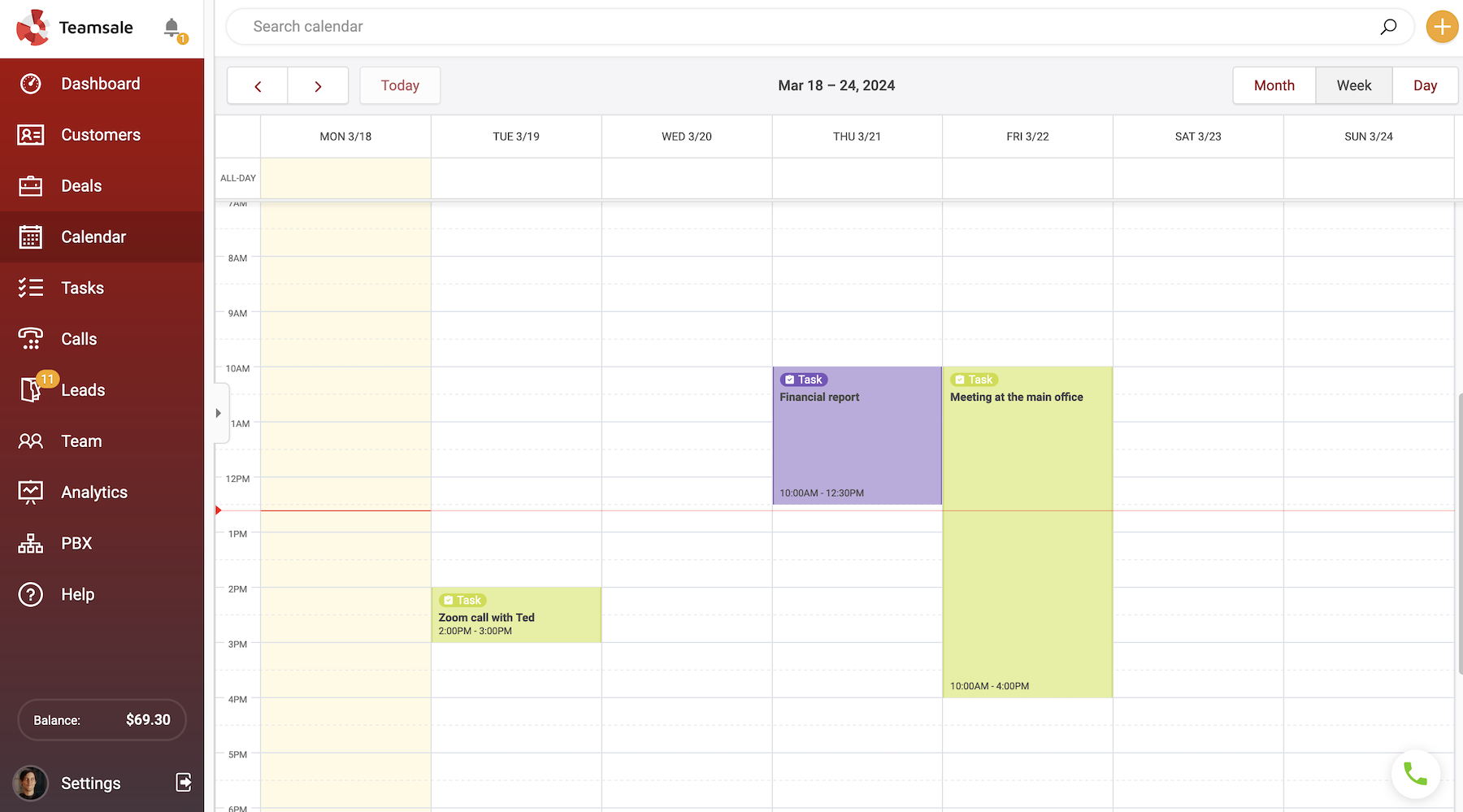
The calendar offers three viewing options: day, week, and month. If you already use Google Calendar, you can set up two-way synchronization, so changes are automatically reflected in both Teamsale and Google Calendar.
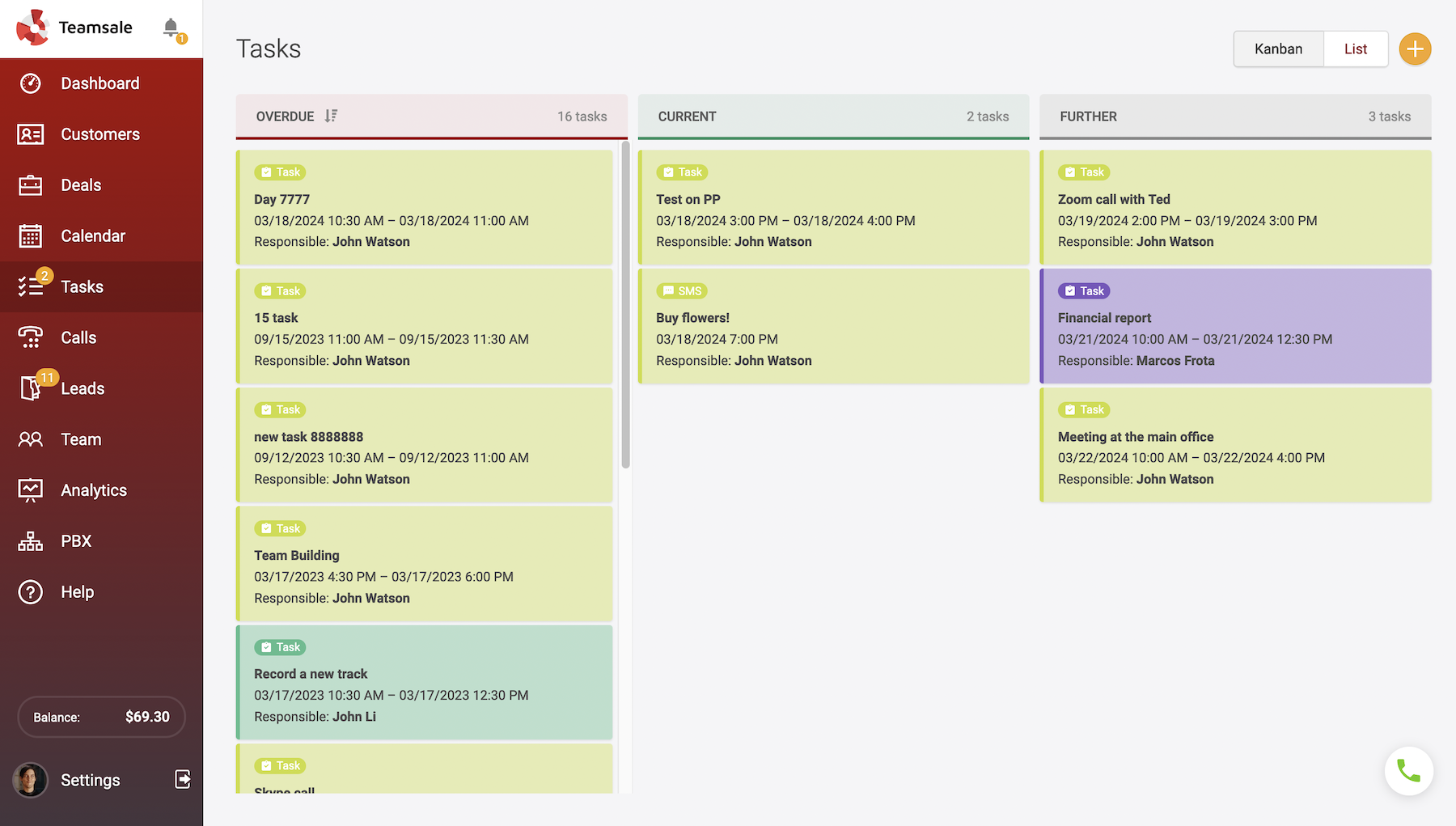
There is also a separate Tasks tab, where the progress of each agent's current and upcoming tasks is clearly displayed either as a list or a Kanban board.
Deal analytics includes deal volume charts, profitability indicators, and a sales funnel - all presented clearly on a single page. Simply select the required period and analyze the resulting data.
In Teamsale, you can also send and receive emails through integrations with popular email services such as Gmail.
A logical question arises: why is all of this free? Many of our products are offered free of charge to increase their reach among business customers. You can see for yourself how effective they are in practice.
How can you avoid burnout when working remotely?
Unfortunately, burnout is common among freelancers because the boundaries of the working day can become blurred. We often continue to live and breathe work, solving tasks in the background and sometimes even logging in to "quickly check" something important. It is extremely important to start and finish work at the same time every day and avoid responding to work-related requests outside those hours.
Set a rule for yourself: no "just a little longer". Your brain needs to understand when the working day is over.
Don't work from bed. Instead, create a dedicated workspace with everything you need: a desk, a comfortable chair with proper back support, good lighting, and so on. Most importantly, make sure there are no distractions around you, such as laundry, kitchen noises, or children's toys. Once your workday is over, you should physically leave this space and move into your "home zone".
There's a reason why we talk about workplace hygiene. You are the main person responsible for your own comfort. Take breaks or do a quick stretch every hour, air out the room, stay hydrated, and don't forget to have lunch. Turn off unnecessary notifications and remember the importance of mentally unwinding after work. A short walk to the store or through a park can help you switch off, stay physically active, and mark the end of your working day. A change of scenery is extremely important for your mental well-being.
By following these simple rules, you can make remote work not only less exhausting but also much more comfortable than working in an office.
FAQs
Why are more and more people choosing to work from home?
People have come to value freedom more and realized that the hours spent commuting take away precious time that could be spent on themselves, their loved ones, or simply relaxing. Some employees have found that they work more efficiently on their own, as not everyone needs to be constantly surrounded by others. Advances in technology make it possible to work from anywhere in the world and, let's be honest, it would be a shame not to take advantage of this opportunity to find the work-life balance that everyone talks about.
How can you avoid overworking when working remotely?
The answer is to automate routine processes. Use Zadarma's free Teamsale CRM to manage customer profiles. Your entire interaction history is stored in one convenient interface. One-click browser calls, deal creation, and call recordings help save time. With AI-powered analytics, you can track metrics that help you evaluate the effectiveness of advertising campaigns and the performance of different products.
How can you plan your day when working remotely?
It's impossible to keep everything in your head, so it's important to keep track of meetings, conferences, and scheduled events. The free Teamsale CRM includes a convenient calendar where you can view current and upcoming tasks. Two-way synchronization with Google Calendar is also available.