 Calls
Calls
 Phone numbers
 SMS
SMS
 Business Phone System
 CRM
CRM
 eSIM for Internet
 AI agent
 AI Speech Analytics
 Click to Call
 Call Tracking
 VoIP for Business
 Become a partner
 Integrations
 For whom
 Setup guides
 FAQ
FAQ
 Online chat
 Contact us
 Blog
Blog
- What is Zendesk?
- What is Zendesk integration with VoIP?
- How Zendesk Talk works
- Why integrate Zadarma with Zendesk?
- Key Features of Zadarma and Zendesk call center integration
- How to set up Zendesk integration with Zadarma
- Zendesk Talk vs Zadarma integration
- Frequently asked questions
Customer expectations for phone support and phone communication with businesses are now higher than ever. Businesses using Zendesk CRM often realize that managing calls outside the system requires additional, unnecessary and time consuming actions. This may increase the number of missed calls, scatter data, and force agents to constantly switch between tabs and log tickets manually. Such additional processes slow response times and negatively affect the customer experience.
That’s why companies choose Zendesk and telephony integration. The integration helps centralize communication with customers on a single platform, add call automation, and reduce workload for employees. Zendesk integration with VoIP allows support and sales teams to handle calls directly inside Zendesk. This feature can be a game changer for business communications.
In this article, we’ll explore how Zendesk and VoIP integration works, its key features, setup process, and pricing to help you decide if it’s the right solution for your business.
What is Zendesk?
Zendesk is a cloud-based customer service and sales platform. Its tools are designed to help improve the customer experience for businesses and also the workflow for the team.
Zendesk helps manage customer support and sales through multiple channels, such as email, chat, phone, and social media. The platform stores customer inquiries and communications within a single, unified interface.
What is Zendesk used for?
Choosing a platform to manage business communications is an important decision that can affect customer support quality, sales success, and team satisfaction. Zendesk addresses all of these areas. The platform is primarily used for the following features:
Sales CRM: Zendesk Sell, the CRM system from Zendesk, allows agents to manage assigned tasks, track deals, and communicate with customers via email, chat, or phone directly from lead, contact, or deal records. The system automatically logs call activity and communication history.
Knowledge Base: Zendesk Knowledge Base allows businesses to build an AI-powered self-service help center. Customers can search for answers to common questions and resolve issues without contacting the support team.
Ticketing System: Zendesk creates tickets for all customer inquiries received via email, chat, phone, and other channels, and stores them in one place. This system helps your team track customer interactions, respond quickly, and follow up efficiently.
Zendesk Talk: Zendesk Talk is a cloud-based call center solution that allows agents to make and receive calls directly within Zendesk. Calls are automatically logged as tickets. This helps teams to track conversations, respond, and provide personalized support.
Analytics and Reporting: With Zendesk Explore, businesses can collect and analyze customer interaction data, track key metrics, and access performance reports.
Chat and Messaging: Zendesk provides two chat solutions: Zendesk Messaging and Zendesk Live Chat. Zendesk Messaging supports omnichannel conversations (including Facebook Messenger and WhatsApp). The system stores all interactions in one workspace. With Zendesk Live Chat you can communicate with customers through the website.
What is Zendesk integration with VoIP?
Telephony integration with Zendesk connects your calls directly to your Zendesk CRM and ticketing system. The integration helps organize customer interactions, respond quickly and follow up customer inquiries. With VoIP integration, every phone call is automatically logged, and call recordings are attached directly to customer tickets.
This automatic logging saves time for the support team, allows to track call history and improves the overall customer experience.
How Zendesk Talk works
Zendesk Talk is the built-in cloud call center within Zendesk. Agents can make and receive calls directly in the Zendesk interface. Every call automatically generates or updates a support ticket. It includes features like call recording, call routing, automatic ticket creation, calls from the browser, IVR (Interactive Voice Response) menus, call recording, and real-time monitoring (the included features depend on the selected plan).
Why businesses consider alternatives
Zendesk telephony is great for basic call management. However, some businesses may need more flexibility, wider international coverage, or advanced PBX features. In these cases, external VoIP integrations like Zadarma can be a strong Zendesk Talk alternative.
Native Zendesk Talk vs External VoIP Integration
With Zendesk Talk you can access built-in Zendesk phone system with voice features and international numbers in 40+ countries. But some advanced features, such as IVR (Interactive Voice Response), may require to upgrade your plan. Usage costs can apply on top of the base subscription.
External VoIP integrations often include additional telephony features, such as full PBX functionality and wider selection of international numbers. Such integration is often chosen by growing or international businesses that look for more flexibility and scalability. After the integration, calls can still be managed directly within Zendesk, so there is no need for the agents to switch between platforms.
Zendesk Talk is a great option for managing customer calls within a single platform. While external VoIP integrations can provide tools for businesses with more advanced telephony requirements.
Why integrate Zadarma with Zendesk?
Integrating Zadarma with Zendesk can help your team efficiently manage calls, tickets, and customer interactions, all in one place. This reduces manual work, keeps conversation history organized, and improves response times.
Zadarma also provides a free Business Phone System, that includes features like:
- Multilevel IVR
- Call routing
- Call recording
- Business hours
- Extensions
- Supervisor mode
- Voicemail
- Conference calls
These features, together with Zendesk CRM, allow any business to build a strong, reliable phone system.
Zendesk phone integration: additional features with Zadarma
Zadarma complements Zendesk by adding an advanced, free business phone system (Cloud PBX) that integrates calls directly into Zendesk CRM. Agents can call clients with one click from contact cards. Incoming calls automatically create tickets to easily track every conversation. Call recordings are saved within the corresponding Zendesk tickets.
These features let agents and supervisors easily see the full conversation history and reduce manual work. The integration also provides a webphone within Zendesk, real-time call statistics, and virtual phone numbers in 110+ countries.
The integration is 100% free. Businesses only pay for virtual numbers and call minutes, with no hidden fees or additional modules required.
Key Features of Zadarma and Zendesk call center integration
Zadarma provides powerful tools that help simplify and automate daily operations for your business.
Main integration features:
- Virtual phone numbers in 110+ countries: Grow and scale your business globally.
- Click-to-call from client card: Start calls directly from a customer’s profile with a single click in Zendesk.
- Incoming call popup: Receive instant visual alerts for incoming calls to never miss a client or lead.
- Automatic ticket creation: Every call is logged as a ticket automatically for an easy follow-up and faster replies.
- Call recordings in Zendesk: Access recordings directly from tickets for quality monitoring and team training.
- Sync call statistics: Performance metrics are updated in real time.
- Webphone within Zendesk CRM: Make and receive calls without leaving the Zendesk dashboard.
- Work via mobile app if Zendesk is closed: If you’re away from your computer or Zendesk isn’t open, you can still make and receive calls via an app (for example, Zadarma for iOS or Android) or a regular IP phone. All call information will appear in the Zendesk helpdesk interface.
How to set up Zendesk integration with Zadarma
Set up your integration by following these 5 simple steps:
Step 1 - Zendesk Requirements
- Integration is available for agents using Talk - Partner Edition.
- The Zendesk user role must be Agent or Administrator.
- API Token Access must be enabled and a token created in Zendesk.
Step 2 - Zadarma Requirements
Set up your Zadarma Cloud PBX:
- Create extension numbers, one for each employee.
- Enable call recording in the extension settings if needed.
- Create a call flow in My PBX - Incoming calls and IVR.
Step 3 - Install Zadarma from the Zendesk Marketplace
Zadarma is a Zendesk Marketplace app.
- Go to Admin - Marketplace.
- Search for Zadarma and install the app.
-
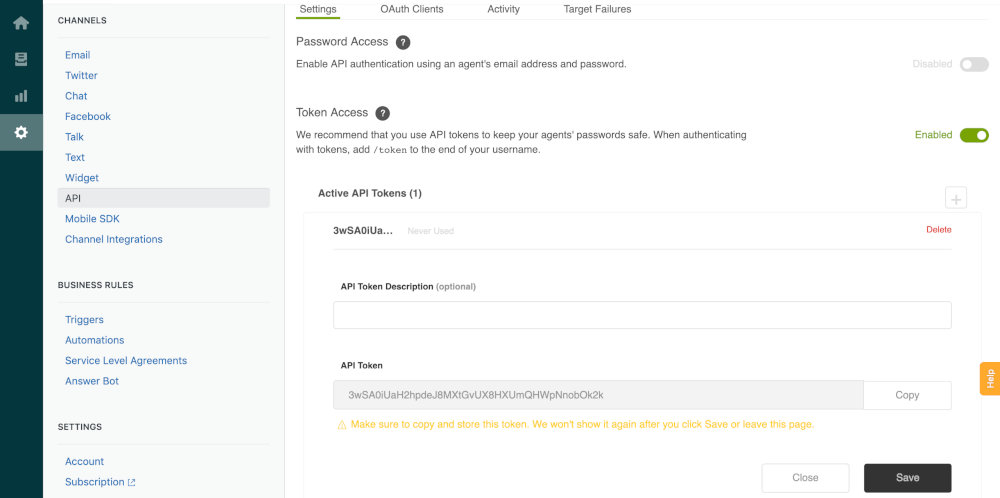
Open Admin Center - Apps and Integrations - Zendesk API.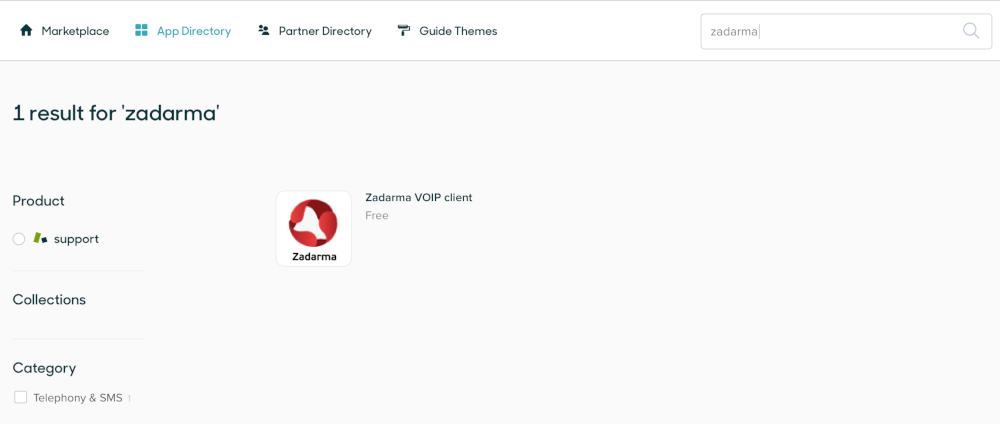
- Enable Token Access, create a token, and save it (this token will be used in your Zadarma account).
Step 4 - Activate the Integration in Zadarma
- In your Zadarma account go to Settings API and Integrations.
- Select Zendesk and click Activate Integration.
- Enter the following information:
- Click Activate Integration.
CRM address - your Zendesk domain
Login - your Zendesk email
Token - the Zendesk API token
Step 5 - Use the Webphone
Click the webphone icon, allow microphone access in your browser, and start making or receiving calls.
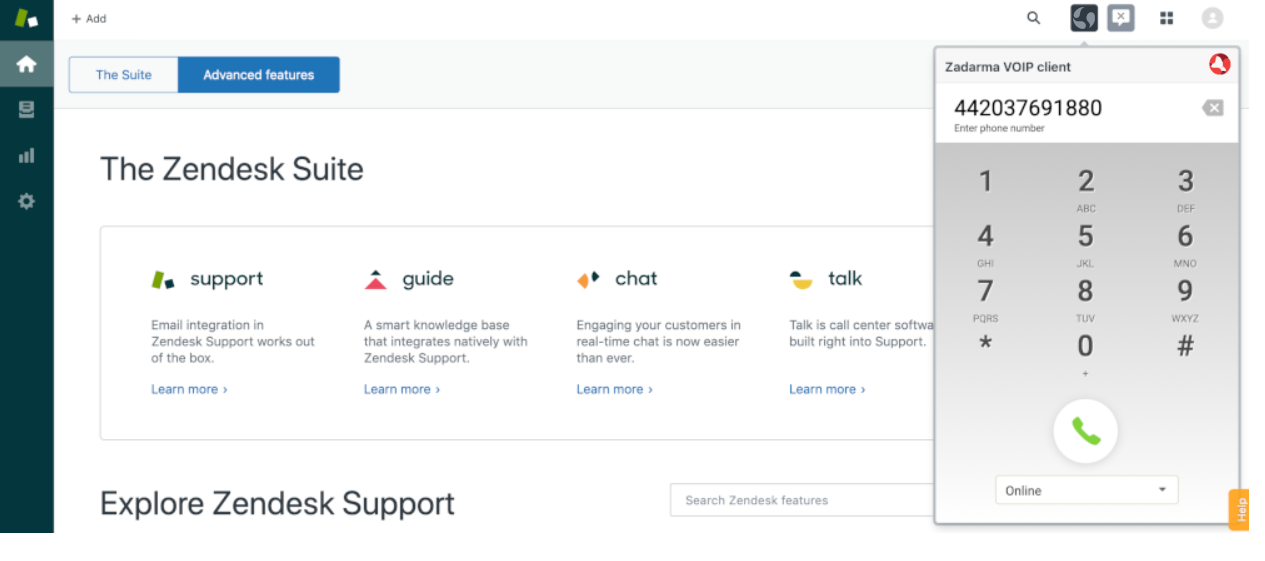
For advanced configurations, you can access Zadarma’s API.
Real use case example
When a customer calls, VoIP and Zendesk integration automatically creates a ticket for the conversation. The agent can immediately view the client’s information on their contact card. The call recording is stored within the ticket for future reference. Supervisors can then review the conversation and ticket to monitor performance and ensure quality support.
Zendesk Talk vs Zadarma integration
External integrations like Zadarma offer several advantages for businesses looking for flexibility, advanced PBX features and broader international reach:
| Feature | Zendesk Talk | Zadarma integration |
| Cloud PBX | No | Free with all plans |
| International numbers | Limited | 110+ countries |
| Call recording | Yes | Yes |
| Integrated webphone | Yes | Yes |
| Pricing | Paid add-on | Integration is free. You only pay for phone numbers and calls at affordable rates. |
| Incoming calls | Paid | Free |
| IVR menus | Only in Suite Professional and Suite Enterprise plans | Free, included in all the plans |
| Voicemail | Not included in Support Team plan | Free within all the plans |
| Call routing | Not included in Support Team plan | Free within all the plans |
| Customer support | Yes | Yes |
Security and reliability
Zadarma has 19 years of experience in cloud-based communication solutions. The company operates secure data centers in six countries on three continents worldwide. Ensuring customer security and data protection is a top priority.
All API authentication is token-based. With no intermediaries involved, your communications and customer data remain private and secure.
Additionally, Zadarma follows industry-standard security practices and holds ISO/IEC 27001 certification. This demonstrates compliance with international information security management standards. Zadarma's data protection and security measures ensure that your business and customer data are handled with the highest level of protection.
How much does zendesk integration cost?
The integration with Zendesk is completely free. Businesses only pay for virtual phone numbers and the call minutes they use in Zadarma, with no extra modules required. There are no hidden fees, and no additional middleware is needed, making it a simple and transparent solution for teams of any size.
Who Is This Integration For?
Zadarma Zendesk integration is ideal for:
- Support teams needing efficient call handling and automation tools
- Sales teams requiring one-click calling and easy access to customer data and interactions
- International companies needing a wide range of international phone numbers
- Remote teams using mobile apps
- Call centers looking for integrated PBX functionality
Frequently Asked Questions
Is Zendesk integration free?
Yes, the integration is completely free. With Zadarma, you only pay for phone numbers and outgoing calls.
Do I need Zendesk Talk?
No, you can use external VoIP such as Zadarma instead of Zendesk Talk. This integration works seamlessly with Zendesk CRM.
Can I use it without technical knowledge?
Yes, the setup is simple. Detailed configuration guides and 24/7 Zadarma customer support are available.
Does Zendesk and Zadarma integration work with mobile devices?
Yes. Calls can be made and received through the mobile app, and tickets are automatically created in Zendesk even when calls are handled on a smartphone.
Can I record calls?
Yes, you can activate call recording in your Zadarma free cloud PBX settings. Recordings are automatically attached to the corresponding Zendesk tickets.
Is it secure?
Yes. All data is protected with token-based authentication and secure servers.