
 Calls
Calls
 Phone numbers
 SMS
SMS
 Business Phone System
 CRM
CRM
 Call Tracking
 eSIM for Internet
 AI agent
 AI Speech Analytics
 Click to Call
 Video conferencing
 VoIP for Business
 Become a partner
 Integrations
 For whom
 Setup guides
 FAQ
FAQ
 Online chat
 Contact us
 Blog
Blog
- What tasks integrating telephony with your own CRM solves
- What makes integration with us truly convenient?
- Technical capabilities of the Zadarma API
- How to implement the integration?
- Who can benefit from this
- Conclusion
- FAQ
In competitive markets, the businesses that succeed most often are those that can analyze processes effectively and use digital tools efficiently for operational tasks. Custom in-house solutions designed for specific company needs also often play an important role.
Every year, we increasingly receive questions about the possibility of integrating custom applications with telephony. This is quite logical: calls have always been and remain the most popular channel of communication between businesses and their clients. The Zadarma cloud PBX easily supports such tasks and offers convenient integration tools.
What tasks integrating telephony with your own CRM solves
Call statistics and recording integration
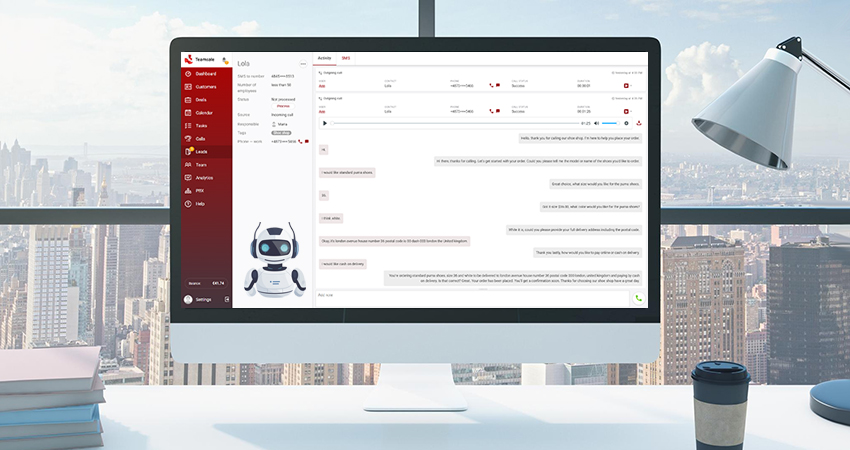
A common use case is automatically logging all calls in the CRM. When an agent makes a call via web phone or callback, the system instantly records all relevant details: start time, duration, participants, and the call outcome. Once the call ends, the recording is automatically saved in the client’s card. This helps analyze communications, resolve disputes, and train new employees using real-life examples.
Automatic lead creation
Continuing with the logic of the previous scenario, the system can not only record calls but determine when to create new client cards. If a call comes from an unknown number or an agent calls a new contact, a lead card is created automatically.
Recognizing new numbers and integrating with CRM saves the team's time: they don't have to manually enter data after each call.
Routing calls to the responsible employee
This is where integrating with your own CRM really shows its value. Automatically routing incoming calls to the responsible agent saves the client’s time and improves conversion rates. Instead of forcing the caller to navigate a multi-level menu, the system can immediately connect them with the agent assigned to that contact in the CRM.
Two-factor authentication
Integrating 2FA into your own applications via telephony allows you to operate independently of third-party services. When a user logs in or confirms an important action, the application automatically initiates a voice call or sends an SMS with a verification code.
The main advantage of this integration is complete control over the process. You can customize message content and choose the verification channel yourself. Learn more about this functionality in this article.
AI agents for communication automation
Voice bots automate the processing of routine inquiries without compromising service quality. When a client calls, the bot identifies the purpose of the request and either responds using data from its knowledge base or transfers the call to a live agent. This provides a completely different level of service compared to traditional IVR menus, where all customers receive the same responses.
After the conversation ends, the call recording and its transcript are sent to the CRM, for live agents to understand the context and continue the communication with the customer more effectively. Learn more about our voice agent in the Services - AI Agent section on our website.
What makes integration with us truly convenient?
High-quality integration starts with developers not having to learn system logic through trial and error. The Zadarma REST API is designed to be as transparent as possible: each request has a clear name and structure, and accurate HTTP response codes make it easy to immediately see the status of any operation. Documentation with real-world code examples and ready-made libraries for PHP, C#, Python, and TypeScript, helps you quickly start implementing your project, reducing development time from weeks to just a few days. You can find the documentation and libraries in the Resources - API Documentation section on our website.
We understand that in modern telephony, even a minute of downtime can mean lost calls and revenue. That's why we guarantee 99.99% uptime thanks to a reliable backup infrastructure. In addition, you get full 24/7 technical support.
Technical capabilities of the Zadarma API
Webhooks for real-time events
The system sends notifications about events in real time: a call started, a client pressed a button in the voice menu, an extension answered, a call ended, or a recording became available. Webhooks allow your system to react instantly without constantly sending requests to the API.
Call control via API
The API provides full control over calls: you can start a call, transfer it to another employee, play a pre-uploaded audio file, or end the call. Commands are processed with minimal delay, so everything happens quickly and without noticeable pauses for the user.
Access to call statistics and data
The statistics include full information about each call: time, duration, participants, direction, and cost. The data is available not only in the web interface but also via the API. This allows you to create your own dashboards, automate reports, and integrate telephony into your business analytics.
Flexible routing settings
The API allows you to change call routing rules. Your system decides where to send the call based on its own logic, without being limited by standard scenarios. At the same time, high processing speed avoids noticeable delays for clients.
Scalability
When your business grows and you need to connect new numbers or change PBX call flows, all this can be done via the API as part of your internal business processes. You can create additional extensions, configure voice menus, and manage virtual numbers without using the web interface.
How to implement the integration?
First, register and connect virtual numbers for calls. The next step is to set up the cloud PBX, as it is required for integration. In the PBX, configure extensions for your team, voice menus with greetings and working hours. You can also access a flexible blacklists management, call queues, button scenarios, and CallerID rules depending on the call direction.
After completing the basic PBX setup, you can proceed with the integration following the instructions.
In addition to the API and calling, Zadarma offers many other useful features: website call widgets, SMS sending, call tracking, and other tools that help build effective communication with customers.
Who can benefit from this
Standard plugins and ready-made connectors work well for typical tasks. However, if you have non-standard business processes, such solutions are often not enough.
SaaS products with communication features
If you are building a platform where communication is part of the core product, ready-made solutions may not be suitable. Telephony should be integrated into the interface, rather than added as a separate module via third-party services.
Your customers shouldn’t have to switch between different applications or learn how to use an external service. Calls, SMS, and call recordings are features of your product, and they should work as reliably as the rest of the system. In this case, the telephony provider’s API becomes a natural extension of your code.
Companies with non-standard business processes
Logistics companies, delivery services, dispatch centers - anywhere communication relies on complex routing logic and integration with dozens of systems, often find that standard solutions fall short. These companies have their own workflows, refined over years for specific processes. Telephony should adapt to this structure, not impose its own limitations.
Scaling startups
At the early stage, simple tools may be enough. But as the product grows and the number of customers increases significantly, the limitations of ready-made integrations start to slow down development. A custom integration allows you to optimize processes for real workloads. The flexibility of the API helps you quickly adapt telephony to new business needs without having to rebuild large parts of your system to fit a third-party service.
Conclusion
The flexibility of a telephony system directly affects how quickly you can implement integration and adapt it to your business needs. A well-designed API, comprehensive documentation with working examples, and technical support that understands code are three factors that can save weeks of development time.
If you use your own CRM, take a look at Zadarma’s documentation: the open API and ready-to-use code examples will help you quickly understand and start implementation.
FAQ
How to choose the best IP telephony provider for your application?
Choose a provider with a modern REST API, a clear request structure, and ready-made libraries (SDK). It’s important that the documentation is simple and includes real code examples — this can save weeks of development.
Also, make sure to check the service’s stability (uptime) before connecting.
How to integrate calls into your own CRM system?
The easiest way is to use the provider’s open API. You need to choose an operator, register, connect virtual numbers, and then follow the technical support team’s instructions for setting up the integration.
With the API, you can activate incoming and outgoing calls and automatically save call histories in your CRM.
Is there a free API for telephony development?
Many reliable providers, including Zadarma, offer free access to their API. You don’t pay for the integration itself or the number of requests — you only pay for actual communication services: phone numbers and call minutes.
This makes it a convenient and cost-effective option for startups and custom projects.
How to automate call handling?
One effective method is to use a cloud PBX in combination with the API. In the PBX, you can configure call flows, such as voice greetings, call queues, working-hour rules, and other call-handling logic.
Through the API, you can access data about calls and keypresses in the IVR menu, transfer calls to the appropriate agents, play pre-recorded audio files, or send data from your server for more complex scenarios.