
 Calls
 Phone numbers
 SMS
 Business Phone System
 CRM
 AI agent
 Call Tracking
 eSIM for Internet
 AI Speech Analytics
 Click to Call
 Price plans
 VoIP for Business
 Become a partner
 Integrations
 For whom
 Setup guides
 FAQ
 API Documentation
 Contact us
 Blog


FAQ
-
 Zadarma
-
 IP Telephony
- What is it?
- What do you get?
- How to make calls?
- What if my provider blocks IP telephony?
- Which number will be used for calls?
- Dialing format
- How to check the call quality?
- What is a SIP trunk? (authorization via IP)
- How to make outgoing calls to different countries using different phone numbers?
- P-Asserted-Identity (outgoing calls from a chosen number for experienced users)
- Zadarma as a BYOC (Bring Your Own Carrier)
-
 Virtual numbers
- Virtual phone number – what is it?
- What virtual number should I connect?
- What documents are required?
- When will my documents be verified?
- How to use one number for several employees?
- How to use a number without internet connection?
- How to identify what number received the call?
- How to connect a number from another provider?
- How to receive calls to your server?
- Why you need call tracking?
- How to receive SMS in messengers?
-
 eSIM
- Does Zadarma's eSIM include a phone number?
- Validity period of the eSIM plan and the amount of traffic used.
- Do I need documents to connect an eSIM and is it possible to get a refund?
- My phone is not in the list of available ones, but I know that the eSIM service is supported.
- Can I buy one eSIM and use it in different parts of the world?
- Can I connect eSIM to another smartphone?
- Is it possible to share the internet via eSIM with other devices?
- eSIM Internet speed and choice of mobile operators.
- How many eSIM cards can be connected to 1 account?
- How to find the eSIM ICCID?
- eSIM installation failed. Error: "Unable to add eSIM. This code is invalid."
-
 Cloud PBX
- How to make and transfer calls?
- Why do you need a cloud PBX, and how much does it cost?
- Business phone system setup in 5 minutes
- How to activate and set up Zadarma cloud PBX?
- How to create and set up the extensions?
- Why configure external lines?
- How to turn on the voice menu?
- DTMF (Dual-tone multi-frequency signaling)
- How to set up the incoming calls scenarios?
- Supervisor - call monitoring, barge-in and whispering
- Where can I find PBX statistics?
- Call recording
- How to listen to call recordings
- How to activate the blacklist?
- Setting up automatic number identification (CallerID) for outgoing Calls
- How to determine where the client called?
- Call forwarding when the employee is offline
- How to receive a fax?
- Temporary PBX switch off
- Conference calls
-
Free Zadarma CRM
- What is CRM?
- Terms of free CRM work
- How to connect CRM for free?
- How to connect employee to CRM?
- How to make and receive calls in CRM?
- Why CRM needs a calendar? What events can be added there?
- How to assign a task to an employee?
- How to schedule a client appointment (task) in a calendar?
- How to import contacts to CRM?
- What is a lead?
- How to create a new lead?
- How to route my clients calls directly to me?
- How to integrate CRM with other systems, apps and programs?
-
 Android program Zadarma
- How to install the app? I have the previous version
- Accepting incoming calls on Xiaomi MIUI phones
- How to know if the app is online? Why I cannot see the app in the background, but the calls are still coming in?
- I have a number from a different operator. Can I use your app for a different VoIP service?
- Zadarma app on Meizu phones
-
 SMS
How to create a new lead?
You can create new leads in several ways.
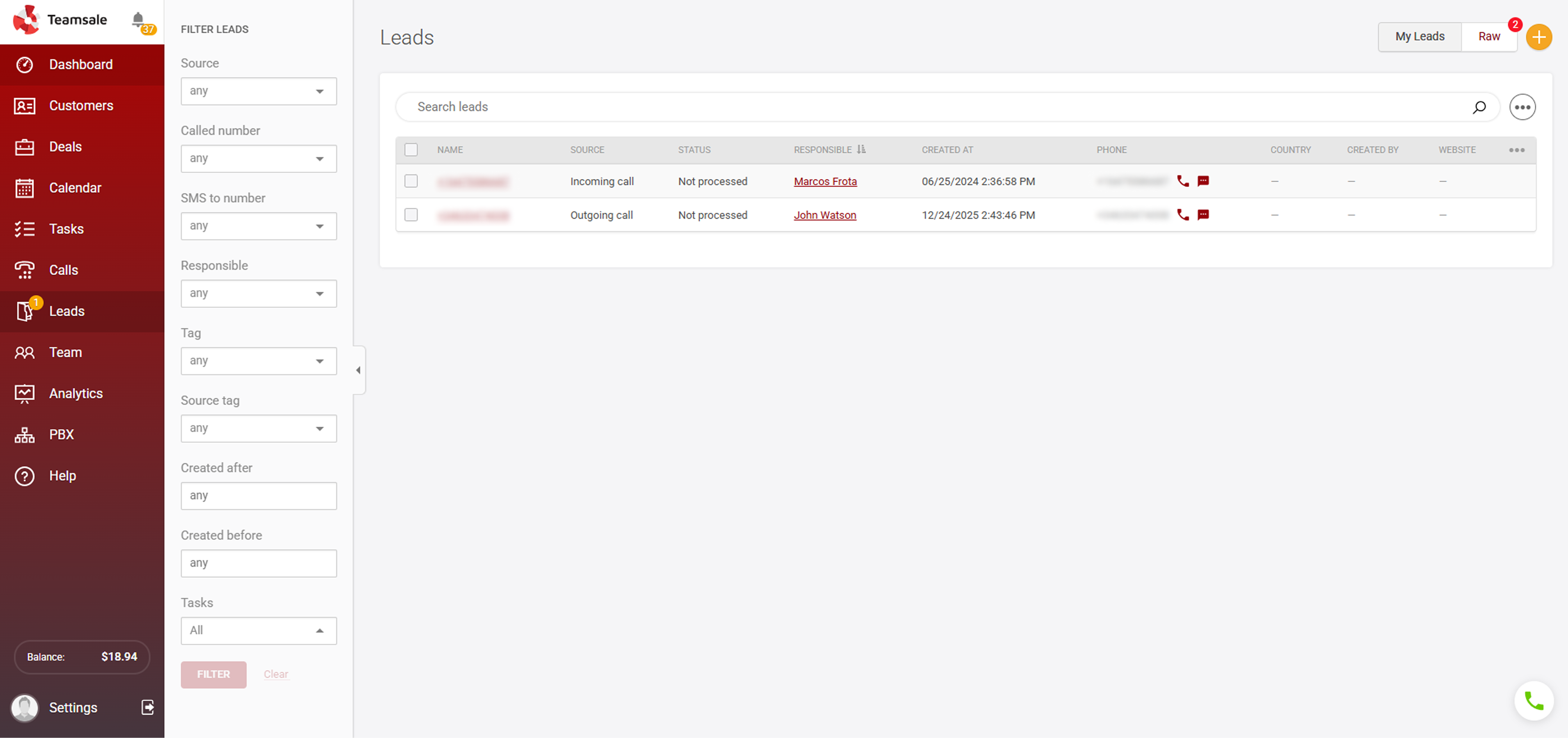
First of all, automatic lead generation is available during incoming calls from unknown numbers.
Secondly, you can create a lead manually. On the appropriate CRM page, you can see two tabs: my leads and raw.
Clicking a plus icon next to the search bar will let you add a new lead. The difference is that a lead created from My leads page will be automatically assigned to you, and the one from the raw tab will remain without a responsible employee.
You can also create a lead via open API CRM interface. For example, it is convenient to add leads from a website form via API. Here you can find an example of how to do it.